Check inHow are you feeling today?
MEET LUMEYRO · BETA
A little care.
Carried forward.
Talk it through. Choose a small next step. Keep what matters—with an AI companion designed to help you return to the things you choose.
iPhone & iPad are in private TestFlight testing. Web Beta is available here with different device capabilities. Ask about native access ↗
Memory you controlGeneral wellbeing supportAdult Beta

A step you chooseA gentle walk, perhaps?
CARING CONTINUITY
Not just a conversation.
A way to come back to it.
Say you have an interview tomorrow. You want a little encouragement—and a moment to reflect afterwards. Here is the idea behind Caring Continuity.
- 01
Talk about it
“I’m nervous about tomorrow.” Choose what to share; you do not have to tell LUMEYRO everything.
- 02
Agree what happens next
Ask to save a note and arrange a check-in. Review the topic, exact times and alert settings.
- 03
See the saved plan
Check Caring for what is remembered and scheduled. A spoken promise alone is not a saved reminder.
- 04
Return, on your terms
When a reminder arrives—or when you reopen Caring—continue, snooze, change or stop the follow-up.
Illustrative scenario, not a live notification demonstration. Delivery depends on device permissions, service readiness, connectivity and quiet hours. No continuous monitoring or guaranteed alerts.
INSIDE THE BETA
Real screens.
A clearer picture.
Actual native-app captures, not concept renders. Preview screens use fictional sample data.
iPhone · Beta screen 1 of 4
A familiar face. A small next step.
Talk or type to the same companion. Conversation is the starting point—not proof that an action has been saved.
Screens captured in October 2026. This is a screen tour, not a recording of live AI, a real invitation or a delivered notification. Sample labels are intentionally retained.
Request a guided demo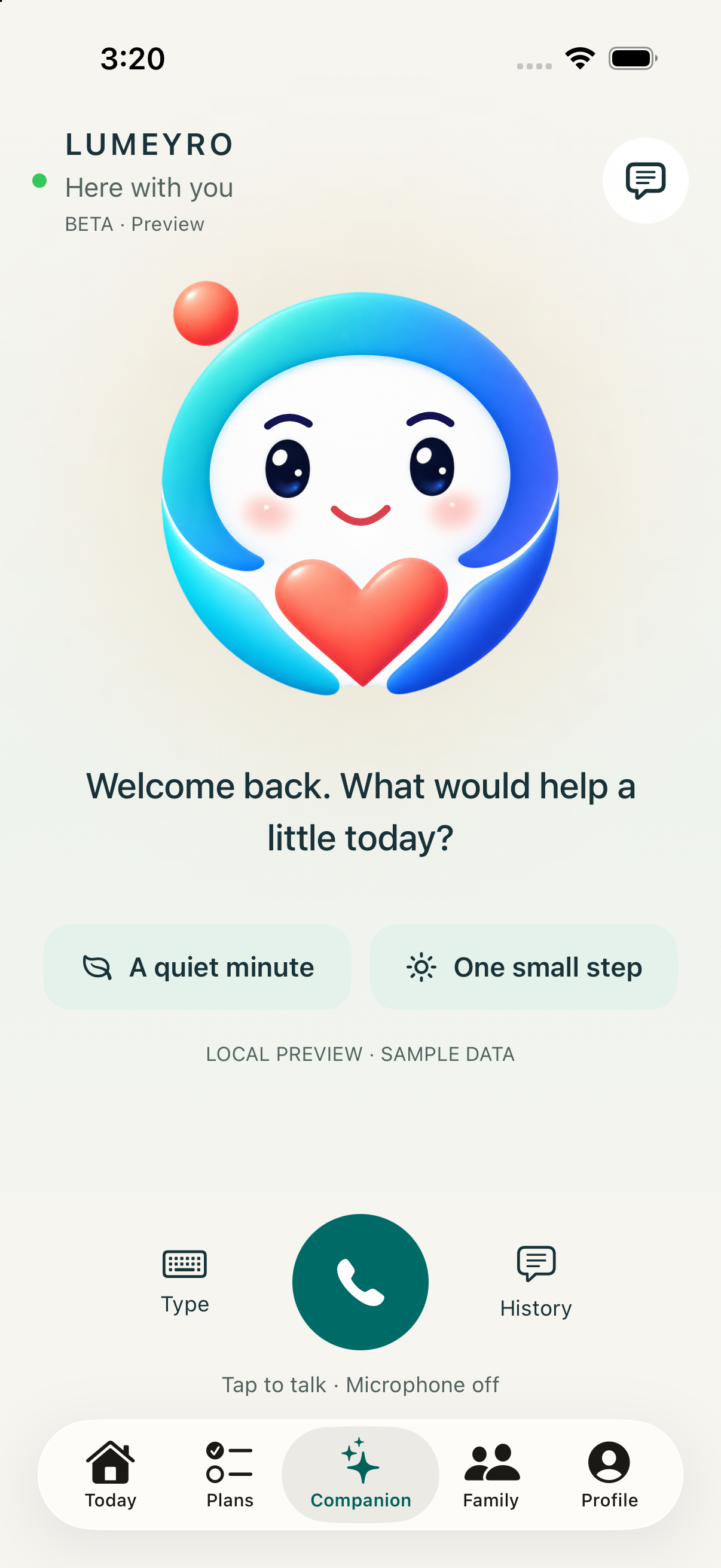
ONE COMPANION, THREE EXPERIENCES
Your support follows you.
Your own account follows you. Family members use separate accounts and choose what to share. Feature availability varies by device.
Your private health hub
Your Beta companion, guided sessions and adult Family Together. Native access is through private TestFlight testing; your iPhone can also connect authorised Apple Health context.
Care, by mutual agreement
Invite another adult, agree a shared activity and each report your own progress. Private conversations and health records stay private.
Plan and reflect anywhere
Talk with your character, keep saved recipes, continue sessions, review Caring and programs, or organise Family Together. Use the same account; see the guide for remaining browser limits.
ILLUSTRATIVE DAILY PLAN
Steady energy, gently
BEST NEXT STEP · 10 MINTake a comfortable walk
Try in my spaceChosen because today has been quieter than your usual routine.
Build a balanced mealProtein, vegetables and a satisfying portion
Take a calm breathing breakA short reset before the evening
SimplifyReplaceLater
ADAPTIVE, EXPLAINABLE, YOURS
AI guidance with you—not at you.
Your saved plans, ideas and agreed activities stay with your account. Device permissions and notification capabilities differ; the guide explains the boundaries.
LUMEYRO notices
It considers only the wellbeing, goals and limited health context you explicitly choose to share.
LUMEYRO explains
Every suggested action includes a simple reason, so support feels understandable rather than mysterious.
You stay in control
Start it, simplify it, replace it or leave it for later. A plan should adapt to your life—not judge it.
Explore Beta features, platform limits and testing examples →
SUPPORT FOR THE WHOLE DAY
Practical help in one organised place.
Adaptive movement
Gentle walks, strength sessions and practical movement breaks shaped to the day.
Meals and recipes
Balanced ideas, simple recipes, groceries and Shop Mode for real-life food planning.
Mindfulness
Breathing, meditation and wind-down support that respects your energy and preferences.
A companion that listens
Talk or type naturally and receive calm, practical, non-judgmental support.
YOUR SUPPORT, YOUR WAY
Begin with the profile that fits today.
Build healthier routines with kindness.
- Movement, energy and sleep context
- Adaptive goals and guided workouts
- Meals, mindfulness and motivation
Steady support alongside your care plan.
- Dated Apple Health glucose history
- Balanced meal and movement support
- Planned check reminders you control
SAFETY & PRIVACY
Your information. Your choice.
LUMEYRO uses only the information you authorise. Sharing, proactive care and spoken responses can be changed at any time.
Read our privacy approachOnly a limited summary is saved when you explicitly enable trend sharing.
LUMEYRO does not diagnose, prescribe, change medication or replace a clinician.
Notifications may be delayed or missed. For urgent help, contact local emergency services; do not wait for LUMEYRO to notice or respond.
Review, correct or forget saved notes. Forgetting one note is not deletion of all related records. Adult activities are shared only by agreement; actual-child access is not released.
BETA ACCESS & PROPOSED MEMBERSHIPS
Start small.
Help shape what comes next.
The web Beta collects no payment. Native testing requires an invitation. Free, Plus and Family are the proposed membership direction; final benefits, Australian pricing and paid availability are not announced.
Free
A caring place to begin
- Daily check-in
- Basic goals and plan
- Limited Companion support
Plus
The complete personal companion
- Proposed paid membership—not purchasable yet
- Beta access follows your account entitlement
- No payment collected by this website
Family
Caring connection—with consent
- Separate accounts, mutual agreement
- Shared walks, meals and wind-downs
- Works across web, iPhone and iPad
QUESTIONS, ANSWERED CLEARLY
Know what LUMEYRO can—and cannot—do.
How can I try the Beta?
You can explore the adult web Beta here without a payment. Native iPhone/iPad testing needs a private TestFlight invitation; a web signup does not grant one automatically. Contact info@lumeyro.com to ask about access. Paid membership availability and final pricing are not announced.
Can my child use LUMEYRO now?
Expanded child-device access is not released for actual children. Private tests are adult-operated and use fictional profiles. Code-based joining and age-adapted family experiences remain subject to safeguarding, privacy, consent, content and operational reviews. They are not a child-care or supervision service.
Will this use my existing app account?
Yes. Sign in with the same account to use the same saved Together records. Refresh after a change on another device. Separate family members need separate verified accounts.
How do I save by voice?
Ask for a recipe, then say ‘Save this recipe’. LUMEYRO must confirm the saved action before you rely on it. Use Library to check; an AI suggestion alone is not a completed save.
How do we cook together?
Open a saved recipe, choose Cook Together, and use Next, Previous, Pause or Read this step. The session stays available when listening starts. Timers use saved end times; they do not determine safe cooking temperatures.
How do Caring reminders work?
First save a Caring note. Agree a check-in schedule, review exact dates and select an already registered Apple device. If wanted, select contacts who accepted missed-check-in sharing. ‘Saved’, ‘queued’, ‘accepted by Apple’ and ‘opened’ mean different things.
Can LUMEYRO forget something?
Yes. Ask to forget a Caring note, then explicitly confirm which note. You can also use Forget in Caring or Memory. Deleting a note does not remove earlier chat, your health profile or every other kind of saved data.
Can I use this without Apple Health?
Yes. The questionnaire and manual entries remain available. Website Progress shows only summaries you chose to sync. The browser cannot directly read your iPhone or iPad’s Health database.
Does the website get notifications when closed?
Not currently. Scheduled remote check-ins can target an eligible iPhone or iPad already registered to your account. Browser push, continuous tracking and guaranteed emergency alerts are not provided.
Are all platforms completely equivalent?
No. The website supports shared companion workflows, but it does not have every native Beta screen or capability. Apple Health reads, Bluetooth and device notification settings belong in the native app; browser voice varies. Full real-device and two-account acceptance remains necessary. Do not assume feature parity from a shared account.
Where do local information and health answers come from?
Browser weather is a MET Norway forecast for a selected area, not a live observation or official warning. City and nearby restaurant searches use Photon / OpenStreetMap, with directions in your chosen map app. Companion can use a dated health summary only when health-summary sharing and personalisation are enabled; it is not a fresh Apple Health read. No health information is sent to map or weather providers.
Is this medical advice or an emergency service?
No. LUMEYRO offers general wellbeing support, not diagnosis, treatment, medication advice or emergency monitoring. If you need urgent help, contact local emergency services rather than waiting for a check-in.
Can my family use different devices?
Yes. One adult can use the website while the other uses iPhone or iPad. Each person needs their own verified account. Open Family, invite their exact sign-in email, and ask them to open Family to accept. No invitation email is sent by this prototype.
What does Family Together share?
Only activity invitations, responses and each person’s self-reported completion. Each adult chooses whether to join and can stop sharing. Private health records, conversations and memories are not shared by this feature. It is not child supervision or emergency monitoring.
Will Family notify me when the website is closed?
The website checks for updates while Family is open. Background alerts require the iPhone or iPad app with notifications enabled and are subject to quiet hours and device settings. Apple accepting a push does not confirm it appeared on the device.
Is LUMEYRO medical care?
No. LUMEYRO provides general wellbeing and lifestyle support. It does not diagnose, prescribe, change medication or replace your clinician.
Does LUMEYRO see all my Apple Health data?
No. Apple Health access is permission-based. Raw records remain on your iPhone, and only limited summaries are synced when you explicitly enable sharing.
How does Accu-Chek Guide Me connect?
Guide Me readings can flow through the mySugr app into Apple Health, then appear in LUMEYRO after you grant Blood Glucose read access.
Can I change an AI suggestion?
Always. You can simplify, replace, postpone or skip a suggested action. LUMEYRO is designed to support your choices.
READY WHEN YOU ARE
Let’s take the next step gently.
Explore the adult web Beta. Use your own account on the native apps if you have a private TestFlight invitation.
INVESTORS & PARTNERS
A personal companion today.
A bigger possibility tomorrow.
Explore the working Beta, the founder’s vision and the next milestones—from dependable personal support to a carefully developed household ecosystem.